Wednesday, 24 February 2016

Atlassian SourceTree 1.8

So today I received an e-mail about the new SourceTree release from Atlassian, since I really like Atlassian products (can you probably tell from other posts on Bamboo) and have been using sourcetree for a while, I was excited to check out the improvements.


What I got was a a complete UI change that has ruined the experience of SourceTree completely, a few of the notes that I and many other haven't liked about it.

Icons
Flat, bland, and near identical icons, means you need to read the text rather than looking at the icon, which I think is the point of an icon, to be visual.


Read Pane

Why oh why is the read pane done in this way, the text is centred. With a white background.
This just is crazy and looks very weird, not sure why this has been done this way.


There is a lot of vocal dislike of this, present here


Monday, 11 January 2016

Bamboo and Squish session 1 vs session 0

Bamboo and Squish 
using different sessions

I am looking at integrating squish and bamboo for GUI testing using QT. Squish is a good choice of tool for this as the program is written in python and Squish can run scripts in python and so a good deal of knowledge can be carried over. However these are some caveats to this approach, the main one I shall address today is that the service and the user GUI run under different sessions and are therefore hard to integrate.

Windows uses different sessions for services, as Bamboo only runs as a service, it runs in session 0, so if a application is started in that session it will not have a GUI. This creates an issue for GUI testing. Squish helpfully gives an API that the squishrunner can use to solve this:

 startapplication("AUT")  

This tells the squish server to start the configured AUT, this will be created in the same session as the squish server which needs to be a user session so that a GUI is created. As you can see that's an other caveat of the process, in that the server needs to be in a user session and so it cannot be started by the bamboo service. Therefore we need to use the auto log-on feature of windows documentation on the windows site here which are summarised below:

[HKEY_LOCAL_MACHINE\SOFTWARE\Microsoft\Windows NT\CurrentVersion\Winlogon]
"AutoAdminLogon"="1"
"AutoLogonCount"=dword:99999999
"DefaultDomainName"="domain.com"
"DefaultPassword"="blahblah"
"DefaultUserName"="squish"

Once logged on we can use a startup script (simple bat file in the startup folder) to run the squishserver and we have a squish server running in a user session that can talk to a squishrunner running in session 0 with the services.

There is another issue with

 startapplication("AUT")  

It starts the application from scratch, for an application with a large startup time this can be quite annoying and time consuming for each test that you need to run a better way is using the startaut application to start the application in an "attachable state" from the first instance. Therefore I wrote a little wrapper for this application so that the AUT is started from the python script in an attachable way. To start it in the user context I compiled the python using py2exe and pass it the attachable parameters...

 """  
   This will create the start aut wrapper for squish and bamboo  
   using py2exe it will start the AUT on the port given.  
 """  
 from __future__ import print_function  
 __author__ = 'jdengel'  
 #######################################  
 # main program starts here  
 import os  
 import sys  
 import subprocess  
 import time  
 def is_number(string_to_test):  
   """  
   :param string_to_test: checks string is a int  
   :return: BOOL  
   """  
   try:  
     int(string_to_test)  
     return True  
   except ValueError:  
     return False  
 def validate_args():  
   """  
   validate the arguments  
   1. number port  
   2. AUT to start  
   3. location of the startaut from squish   
   :return:  
   """  
   if len(sys.argv) != 4:  
     print("incorrect number of paramter given\n"  
        "expected:\n"  
        "port, app, location of startaut")  
     return 2  
   if is_number(sys.argv[1]) is False:  
     print("Port is not a number {0}".format(sys.argv[1]))  
     return 3  
   if os.path.isfile(sys.argv[2]) is False:  
     print("file to start does not exist, this is an issue {0}".format(sys.argv[2]))  
     return 4  
   if os.path.isfile(sys.argv[3]) is False:  
     print("start aut application does not exist {0}".format(sys.argv[3]))  
     return 5  
   return 0  
 RET_VALUE = validate_args()  
 if RET_VALUE is not 0:  
   sys.exit(RET_VALUE)  
 # open the AUT on the right port  
 try:  
   subprocess.Popen([sys.argv[3], '--port={}'.format(sys.argv[1]), sys.argv[2]])  
   print("Starting application to test on port {0}", sys.argv[1])  
 except SystemError, exp:  
   print("Fatal error - {0}".format(exp.message))  
   sys.exit(8)  
 print("finishing START_AU application")  

This allows the squish scripts to start the application in an attachable state and therefore streamline the process of testing since an application might take a long time to startup.

The only thing to be careful of it that you reset the application back to a known state after the test has finished. This can be done using the init and cleanup functions in the squish python script.

So now you can streamline your testing.

Wednesday, 6 January 2016

Restart Windows machine remotely.

Let's face it sometimes you have to restart a machine.

But it's a VM, or you remote into the machine so you don't have access to the machine itself.

You need a way to restart a machine remotely and easily without having to remote in each time you want to do it.

You need the shutdown command that's in the command prompt. It takes the following arguments.

ParameterFunction
-sShuts down the computer.
-rReboots the computer.
-fForce-close all running applications.
-m \\ComputerSpecifies a specific computer on the network that you want to shut down or reboot. Absent this parameter, the command affects only the local PC on which it is run.
-t xxSets a delay (xx seconds) before the specified operation commences.
-c "message"Add your own text inside the quotations to provide remote users with a message about why and when their PC will shut down or reboot.
/aAborts a shutdown or restart if used during the (-t) delay period.
/hHibernates the computer.
/?Displays the full help document with all commands.

Now imagine that you need to restart a bamboo agent cluster as you updated the server and it requires a restart of the agents.

No problem as you can whip up a bat file to go through the cluster restarting the agents. 

shutdown -f-r -m \\computer1
shutdown -f -r -m \\computer2

Now you have a simple script to restart a bank of computers without any trouble, no logging in or remotely accessing the machines.


Thursday, 3 December 2015

Bamboo and Python Unit Tests

Recently I have been moving to Bamboo and integrating all the sweet features that it has available. Using it has been a bit of mare to do some things - (Bamboo and Squish for GUI testing) I'll detail that in another post, and bamboo's design and use is completely different to Jenkins.

I think Bamboo's plan, task and job approach is very top down, as opposed to Jenkins which is quite bottom up.

However one of the easier things to get done was getting the build to fail on the output of units tests created using the standard library in python. Then getting the failures to appear once the build has been completed in the build results.

An example:

Create a new repository with a test folder with a test_test.py file containing the below


def test_failure():
    assert False
def test_pass():
    assert True

This created a very simple unit test case to check in bamboo. One pass and one fail. Simple right...

So create a new plan that has a single job with tasks to
a. clone the repository
b. run the tests, remembering to pipe the output into a junit xml output to the test report folder:

py.test --junitxml=test-reports\results.xml
exit 0

the exit 0 is important on windows because if you don't do this the bamboo job can fail from a failure to run the tests at this point and does not parse the results of the tests for display in the bamboo GUI. This is not what you want to occur because if the tests fail to run you still want the tests that you have run to give you information from the results screen.

Then use a junit parser task (built into bamboo from the word go) to process the results:


BAM (boo)
job done.

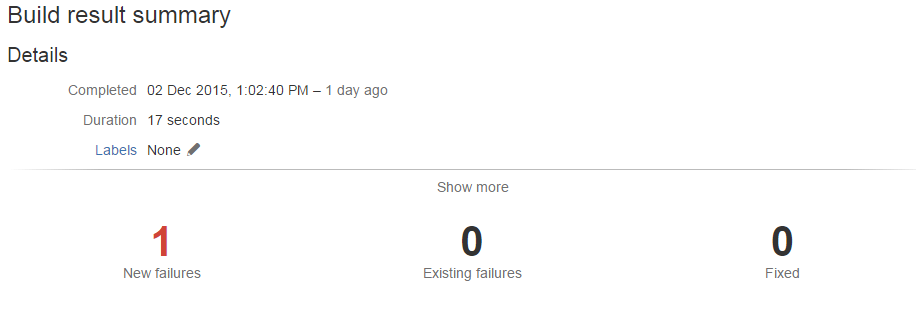
Unit test in bamboo, detecting a unit test fail and showing details about the test and number of builds it has been failing for. In all this is a really useful feature of bamboo that can be configured out of the box pretty much,

Friday, 2 October 2015

Creating PyVisa Wheel install on Windows

So I have some legacy software that requires PyVisa 1.3 and I'm building wheels for all the packages that require this as this is the new standard for python packaging.

I was having issues creating the wheel file or even installing from the tar file from PyPi until I came across this bug report and it worked a treat.

To sum up all the actions that I needed to do.

1. Get the Tar file.
2. Extract the source.
3. make the following changes

setup.cfg:
-prefix = /usr 
In 'setup.py' home_dir can be derived in a platform independent fashion:
setup.py:
- home_dir = os.environ['HOME']
+ home_dir = os.path.expanduser('~')

4. Navigate to the root of the source and make the wheel file

python setup.py bdist_wheel

Viola you have a windows wheel file that can be installed fast and effective to all virtual environments.

The newer versions are much easier to package into wheel files. I will be sure to post up about other packages that I have any issues with and the solutions to them as well.

Thursday, 27 August 2015

Reserved Filenames on Windows

So today I was working on a full Atlassian product suite, you know Stash, Bamboo, JIRA. And we had a well known code base (the Linux kernel itself) that we are compiling on our Linux build agent.

However one of the development platforms is Window 7 (yes Windows 7 doesn't develop the Linux kernel but this is a test of the product suite and not windows 7 ability to compile the Linux kernel). So I'm cloning the Linux Kernel from Stash to Window 7 and it fails half way through and I'm thinking "Oh no Stash and Git must be configured incorrectly."

Once inspecting the git errors however it was complaining of

fatal: git rm: 'drivers/gpu/drm/nouveau/nvkm/subdev/i2c/aux.c': Permission denied

Obviously this had me trying again and then trying to create a file called aux.c on the desktop.

Queue a most random error from a file creation I have seen


The error was "specific device name is invalid" when creating the file aux.c on the desktop. Now as you can tell this got my interest and so off to google and windows and aux.c.

This lead me to an interesting little knowledge base article

https://support.microsoft.com/en-gb/kb/74496

where it details that some filenames on windows are reserved for certain things.

  Name    Function
   ----    --------
   CON     Keyboard and display
   PRN     System list device, usually a parallel port
   AUX     Auxiliary device, usually a serial port
   CLOCK$  System real-time clock
   NUL     Bit-bucket device
   A:-Z:   Drive letters
   COM1    First serial communications port
   LPT1    First parallel printer port
   LPT2    Second parallel printer port
   LPT3    Third parallel printer port
   COM2    Second serial communications port
   COM3    Third serial communications port
   COM4    Fourth serial communications port

Has anyone ever come across this before, it such an oddity of Windows to do this.....