Another small issue while working on bamboo today, I wanted to only trigger a bamboo plan from a specific subset of a SVN or GIT repository, so we can only trigger full test builds when we change real code and not on documentation updates.
So you think this would be easy right ? Not exactly.
There is a menu option in Bamboo under the repositories menu as follows :
So input a small change like the above for change just on XML files. Change the files in the test repository and boom, nothing.
So it turns out after some digging that Bamboo only matches on the full file path, some examples are here
After knowing this it becomes a little easier to get right, but it's not obviously clear and as a user there is no trigger log immediately available it's not clear how to proceed, hopefully this clears things up.
Showing posts with label Bamboo. Show all posts
Friday, 25 November 2016
Monday, 11 January 2016
Bamboo and Squish session 1 vs session 0
Bamboo and Squish
using different sessions
I am looking at integrating squish and bamboo for GUI testing using QT. Squish is a good choice of tool for this as the program is written in python and Squish can run scripts in python and so a good deal of knowledge can be carried over. However these are some caveats to this approach, the main one I shall address today is that the service and the user GUI run under different sessions and are therefore hard to integrate.
Windows uses different sessions for services, as Bamboo only runs as a service, it runs in session 0, so if a application is started in that session it will not have a GUI. This creates an issue for GUI testing. Squish helpfully gives an API that the squishrunner can use to solve this:
startapplication("AUT")
This tells the squish server to start the configured AUT, this will be created in the same session as the squish server which needs to be a user session so that a GUI is created. As you can see that's an other caveat of the process, in that the server needs to be in a user session and so it cannot be started by the bamboo service. Therefore we need to use the auto log-on feature of windows documentation on the windows site here which are summarised below:
[HKEY_LOCAL_MACHINE\SOFTWARE\Microsoft\Windows NT\CurrentVersion\Winlogon]
"AutoAdminLogon"="1"
"AutoLogonCount"=dword:99999999
"DefaultDomainName"="domain.com"
"DefaultPassword"="blahblah"
"DefaultUserName"="squish"
Once logged on we can use a startup script (simple bat file in the startup folder) to run the squishserver and we have a squish server running in a user session that can talk to a squishrunner running in session 0 with the services.
There is another issue with
startapplication("AUT")
It starts the application from scratch, for an application with a large startup time this can be quite annoying and time consuming for each test that you need to run a better way is using the startaut application to start the application in an "attachable state" from the first instance. Therefore I wrote a little wrapper for this application so that the AUT is started from the python script in an attachable way. To start it in the user context I compiled the python using py2exe and pass it the attachable parameters...
"""
This will create the start aut wrapper for squish and bamboo
using py2exe it will start the AUT on the port given.
"""
from __future__ import print_function
__author__ = 'jdengel'
#######################################
# main program starts here
import os
import sys
import subprocess
import time
def is_number(string_to_test):
"""
:param string_to_test: checks string is a int
:return: BOOL
"""
try:
int(string_to_test)
return True
except ValueError:
return False
def validate_args():
"""
validate the arguments
1. number port
2. AUT to start
3. location of the startaut from squish
:return:
"""
if len(sys.argv) != 4:
print("incorrect number of paramter given\n"
"expected:\n"
"port, app, location of startaut")
return 2
if is_number(sys.argv[1]) is False:
print("Port is not a number {0}".format(sys.argv[1]))
return 3
if os.path.isfile(sys.argv[2]) is False:
print("file to start does not exist, this is an issue {0}".format(sys.argv[2]))
return 4
if os.path.isfile(sys.argv[3]) is False:
print("start aut application does not exist {0}".format(sys.argv[3]))
return 5
return 0
RET_VALUE = validate_args()
if RET_VALUE is not 0:
sys.exit(RET_VALUE)
# open the AUT on the right port
try:
subprocess.Popen([sys.argv[3], '--port={}'.format(sys.argv[1]), sys.argv[2]])
print("Starting application to test on port {0}", sys.argv[1])
except SystemError, exp:
print("Fatal error - {0}".format(exp.message))
sys.exit(8)
print("finishing START_AU application")
This allows the squish scripts to start the application in an attachable state and therefore streamline the process of testing since an application might take a long time to startup.
The only thing to be careful of it that you reset the application back to a known state after the test has finished. This can be done using the init and cleanup functions in the squish python script.
So now you can streamline your testing.
Location:
Swindon, Swindon, Swindon, UK
Wednesday, 6 January 2016
Restart Windows machine remotely.
Let's face it sometimes you have to restart a machine.
But it's a VM, or you remote into the machine so you don't have access to the machine itself.
You need a way to restart a machine remotely and easily without having to remote in each time you want to do it.
You need the shutdown command that's in the command prompt. It takes the following arguments.
But it's a VM, or you remote into the machine so you don't have access to the machine itself.
You need a way to restart a machine remotely and easily without having to remote in each time you want to do it.
You need the shutdown command that's in the command prompt. It takes the following arguments.
| Parameter | Function |
|---|---|
| -s | Shuts down the computer. |
| -r | Reboots the computer. |
| -f | Force-close all running applications. |
| -m \\Computer | Specifies a specific computer on the network that you want to shut down or reboot. Absent this parameter, the command affects only the local PC on which it is run. |
| -t xx | Sets a delay (xx seconds) before the specified operation commences. |
| -c "message" | Add your own text inside the quotations to provide remote users with a message about why and when their PC will shut down or reboot. |
| /a | Aborts a shutdown or restart if used during the (-t) delay period. |
| /h | Hibernates the computer. |
| /? | Displays the full help document with all commands. |
Now imagine that you need to restart a bamboo agent cluster as you updated the server and it requires a restart of the agents.
No problem as you can whip up a bat file to go through the cluster restarting the agents.
shutdown -f-r -m \\computer1
shutdown -f -r -m \\computer2
Now you have a simple script to restart a bank of computers without any trouble, no logging in or remotely accessing the machines.
Location:
Swindon, Swindon, Swindon, UK
Thursday, 3 December 2015
Bamboo and Python Unit Tests
Recently I have been moving to Bamboo and integrating all the sweet features that it has available. Using it has been a bit of mare to do some things - (Bamboo and Squish for GUI testing) I'll detail that in another post, and bamboo's design and use is completely different to Jenkins.
I think Bamboo's plan, task and job approach is very top down, as opposed to Jenkins which is quite bottom up.
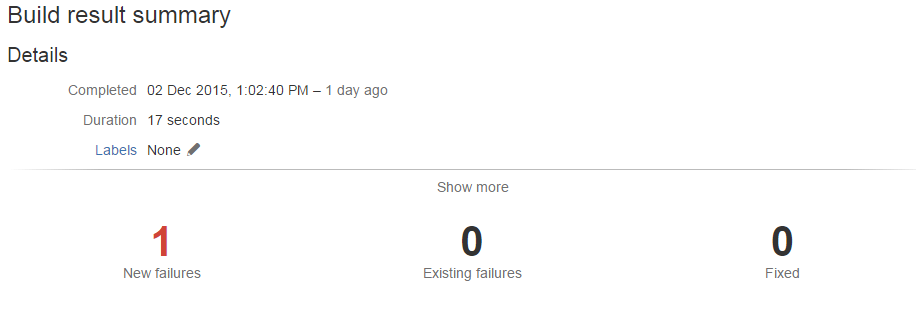
However one of the easier things to get done was getting the build to fail on the output of units tests created using the standard library in python. Then getting the failures to appear once the build has been completed in the build results.
An example:
Create a new repository with a test folder with a test_test.py file containing the below
This created a very simple unit test case to check in bamboo. One pass and one fail. Simple right...
So create a new plan that has a single job with tasks to
a. clone the repository
b. run the tests, remembering to pipe the output into a junit xml output to the test report folder:
py.test --junitxml=test-reports\results.xml
exit 0
the exit 0 is important on windows because if you don't do this the bamboo job can fail from a failure to run the tests at this point and does not parse the results of the tests for display in the bamboo GUI. This is not what you want to occur because if the tests fail to run you still want the tests that you have run to give you information from the results screen.
Then use a junit parser task (built into bamboo from the word go) to process the results:
I think Bamboo's plan, task and job approach is very top down, as opposed to Jenkins which is quite bottom up.
However one of the easier things to get done was getting the build to fail on the output of units tests created using the standard library in python. Then getting the failures to appear once the build has been completed in the build results.
An example:
Create a new repository with a test folder with a test_test.py file containing the below
def test_failure(): assert False def test_pass(): assert True
This created a very simple unit test case to check in bamboo. One pass and one fail. Simple right...
So create a new plan that has a single job with tasks to
a. clone the repository
b. run the tests, remembering to pipe the output into a junit xml output to the test report folder:
py.test --junitxml=test-reports\results.xml
exit 0
the exit 0 is important on windows because if you don't do this the bamboo job can fail from a failure to run the tests at this point and does not parse the results of the tests for display in the bamboo GUI. This is not what you want to occur because if the tests fail to run you still want the tests that you have run to give you information from the results screen.
Then use a junit parser task (built into bamboo from the word go) to process the results:
BAM (boo)
job done.
Unit test in bamboo, detecting a unit test fail and showing details about the test and number of builds it has been failing for. In all this is a really useful feature of bamboo that can be configured out of the box pretty much,
Labels:
Bamboo,
Python,
unit-testing
Location:
Swindon, Swindon, Swindon, UK
Subscribe to:
Posts (Atom)